 domaiya
CALENDAR, CLEANING & TASKS
Less “I thought you did it.”
More getting it done.
The dentist appointment, the kitchen clean and dinner all belong to the same day. Domaiya connects the household calendar with practical jobs and cleaning records, so arrangements have a place to be seen.
01
See the household day in context
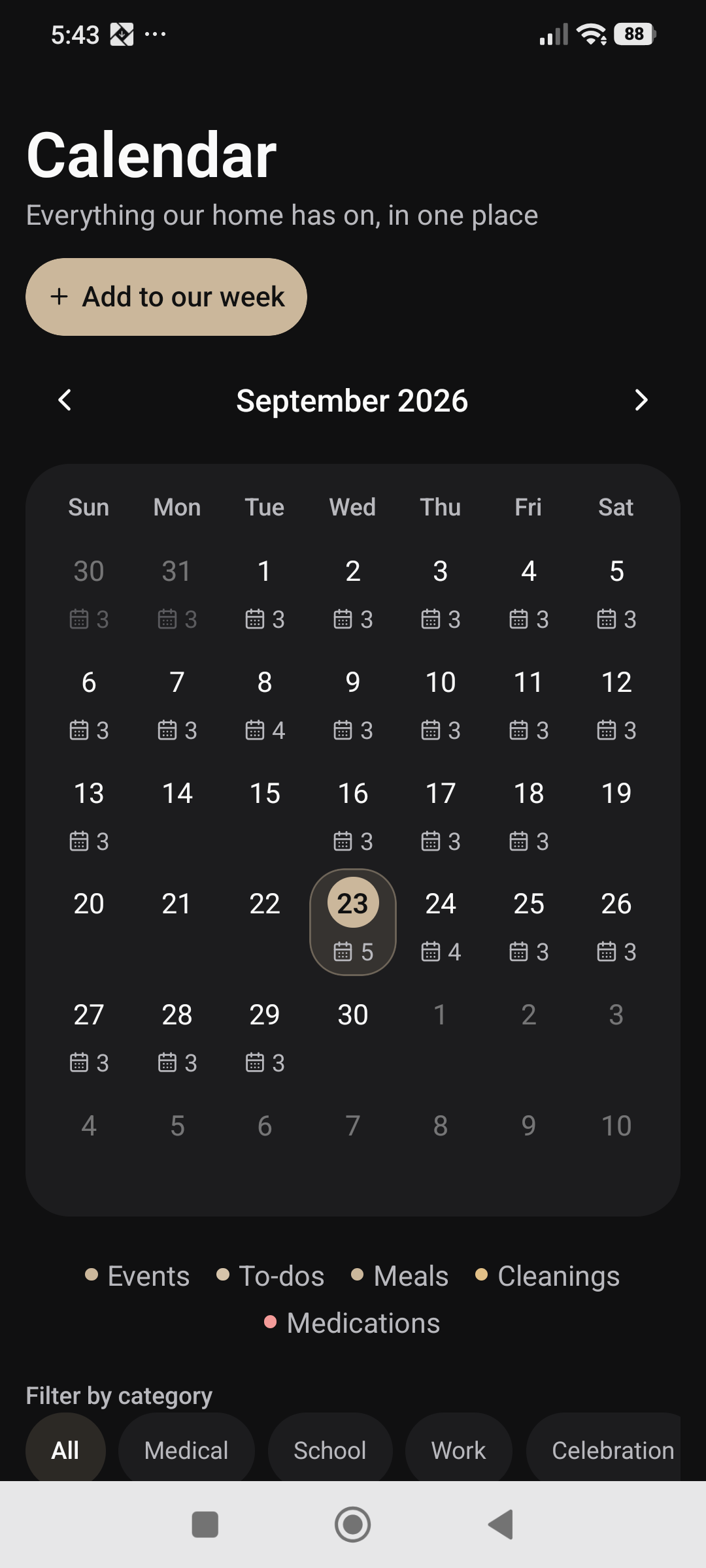
Open the month calendar and choose a date to see what is happening. Appointments, tasks, planned meals, cleaning and medication entries you are allowed to see can appear together. Filter by category when you want to focus on one part of the day.
From a selected day you can add an appointment or a task without rebuilding the date from memory. Meals remain connected to the meal planner, so a dinner plan is part of the household schedule rather than a separate note.
02
Make a cleaning rota around your actual rooms
Add rooms such as the kitchen or bathroom, choose a cleaning frequency and assign a household member—or leave it open to anyone. The room view shows what needs attention, while completion history records when work was done and who recorded it.
Choose routines that fit your home. A weekly bathroom clean and a daily kitchen reset can have different frequencies. The record helps the household discuss the routine using saved work, rather than everyone trying to remember the last time.
03
Agree what “done” means
For a room or job, you can require a photo of the completed work. You can also turn on household confirmation so a manager reviews the result before it is treated as complete. These controls are useful when the household wants a shared standard.
When confirmation is required, the completion remains submitted until it is reviewed. The reviewer can approve it or request changes. Photo proof and confirmation are choices for the household, not requirements you have to enable for every small job.
04
Handle the work between the routines
Use jobs and tasks for things such as collecting a parcel, trimming a hedge or booking a repair. Add an assignee, date and time where needed. Cleaning jobs can repeat daily, weekly or monthly, so a recurring responsibility has a recorded routine.
Check history when you need to see completed work. Keep the plan manageable: clear job names, realistic dates and agreement about who owns the task make the organiser more useful than a long list nobody reviews.
A SMALL ROUTINE. A USEFUL DIFFERENCE.
How to get started
Add the dates
Save appointments and tasks in the household calendar.
Build the rota
Create rooms, choose frequencies and assign responsibility.
Choose completion rules
Use photo proof or manager confirmation where they help.
Review the day and the history
See upcoming work and keep completion records current.
IN EVERYDAY LIFE
Picture this.
Flatmates agree on a weekly kitchen clean, assign the room and decide whether a photo is useful. The person responsible records completion, and the history provides a shared reference next time the rota comes up.
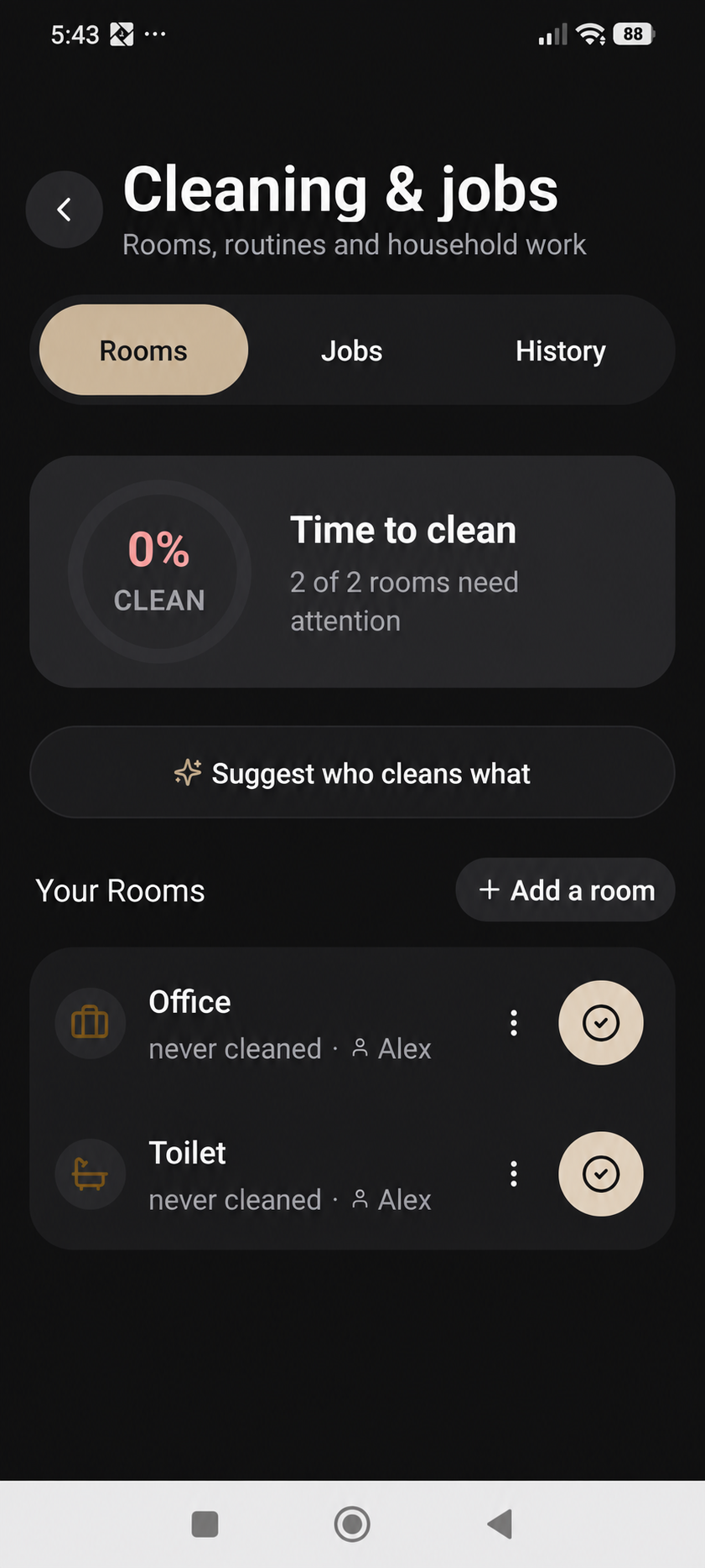
WATCH THE REAL APP
Set up a shared cleaning routine
27 seconds · Light mode · HD · Willa narration and English captions. A real phone demonstration of setup and review, with no household changes saved.
Synthetic voice. Edited for length.
THE USEFUL DETAILS
Your questions, answered.
Do I have to require a photo for every clean?
No. Photo requirements and confirmation are configurable for the relevant room or job.
Does the calendar expose everyone’s medication?
No. Medication visibility follows access rules. A private medication is not made public to the household simply because a calendar exists.
Can cleaning jobs repeat?
Yes. You can choose repeating daily, weekly or monthly jobs; rooms also have a cleaning frequency.
MAKE IT PART OF YOUR DAY
Agree the job before adding it.
Make the task specific
Choose a short title that makes the job clear. Add the detail someone needs to understand what is expected.
Choose responsibility deliberately
Review the available assignee and date options. Set repetition, notification, photo and review requirements only when they fit the job.
Check the saved task
Open the saved task and check its details. Keep a scheduled task separate from a job that has actually been completed.
Maintain the plan
Edit or remove an outdated job rather than leaving an unclear instruction in the household list.